



Meet
Autocapture



September 28, 2026
Onboarding & Tool Rollouts That Stick: How Expert Bruce Lam Uses Scribe to Make Onboarding Fun
In this article

Instantly capture and optimize workflows so your team works smarter and faster.
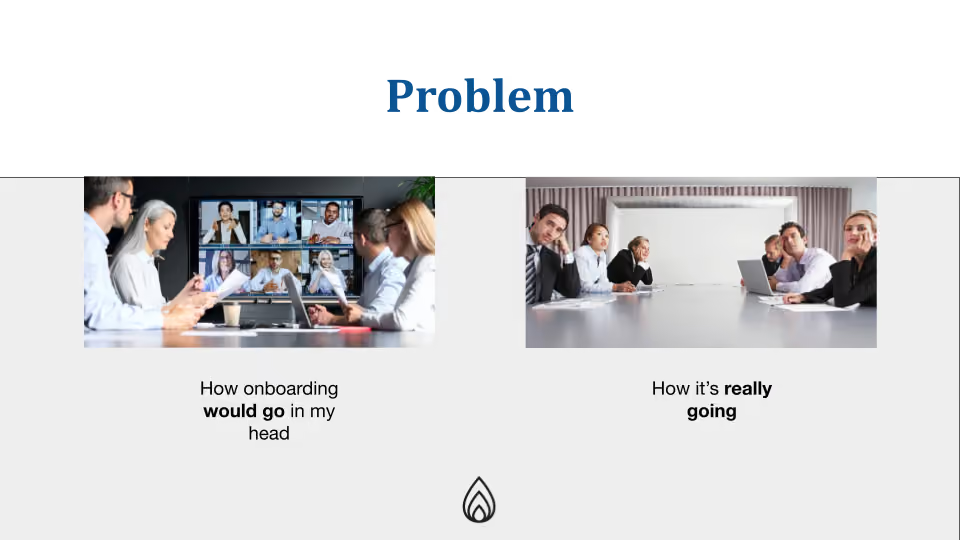
We’ve all been there: Your company invests thousands in a shiny new enterprise tool, you spend weeks configuring it, and then comes "Launch Day". You look out at your team during the training session only to see a sea of blank faces having a staring contest with you. Everyone’s learning style is different, and by making the onboarding process cater to each persona, you can see some incredible results.
In our recent webinar, Bruce Lam, independent recruiter and Owner of Boring Resume, joined Scribe’s Nico Carmosino to share how he solves this "tool fatigue.”
By moving away from "Sloppy Operating Procedures" and toward a gamified, self-service model, Bruce transforms onboarding from a chore into an interactive experience.
Here is a detailed recap of Bruce’s expert strategies for making tool rollouts stick!
Why Traditional Tool Rollouts Fail
According to Bruce, rollouts often fail because the in-house team doesn’t have the bandwidth to implement, recruit, and train all at once. Most companies rely on a stale playbook: one person who knows everything tries to teach everyone else simultaneously.
This creates several friction points:
- The "Blank Face" Phenomenon: Users don't see the immediate value to their specific workflow.
- Lack of Visibility: In a distributed world, you don't know if a teammate even opened the training deck or requested access.
- Irrelevant Training: Users come in with different experience levels; some need a deep dive, while others just need to get one task done quickly.
The Framework: Gamifying the Onboarding Experience
To fix broken onboarding, Bruce reframes the process through a design lens: "How can we enable successful self-onboarding through gamification?" He uses four key game mechanics to keep users engaged:
1. Free Movement
The best games let players explore without being penalized. Effective onboarding should allow users to investigate the tool on their own time rather than being forced into a rigid, hour-long live session.
2. Feedback Loops
Users need to know where they stand. In a game, you know if you’ve won or if you need to "respawn.” Bruce uses Scribe’s Insights to create these loops, letting users know they are on the right track.
3. Freedom to Choose Your "Character"
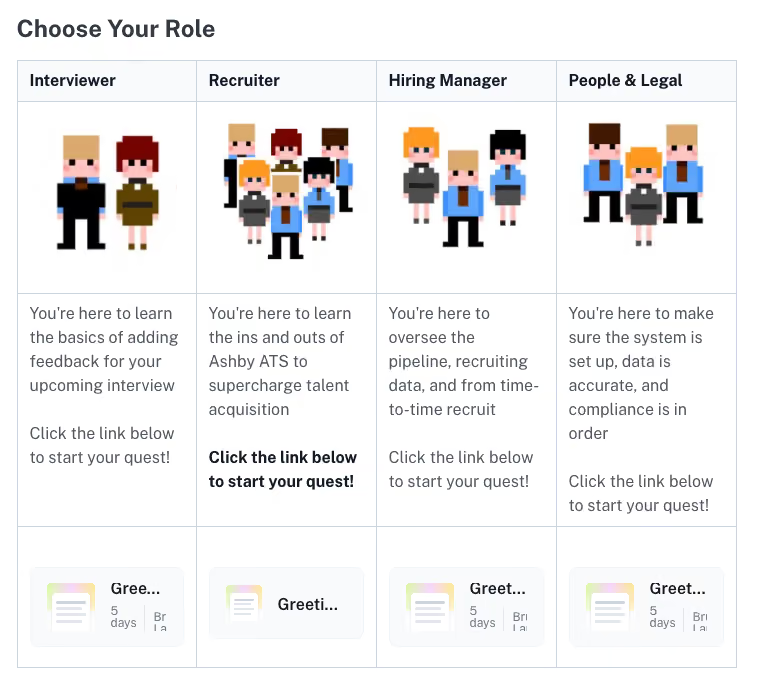
Standard manuals assume everyone follows the same path. Bruce builds Scribe Pages that let users choose their role, such as Interviewer, Recruiter, or Hiring Manager, so they only see the documentation relevant to their job.
4. Progression and Leveling
Onboarding isn't a one-time event. As tools evolve, so should the user. By structuring tutorials as "Levels" or "Quests," Bruce encourages continuous learning and mastery.
Real-World Application: Onboarding with Ashby
Bruce demonstrated how he used Scribe to implement Ashby, a robust recruiting CRM. Instead of a boring PDF, he created a customized Scribe Page that acted as a central hub.
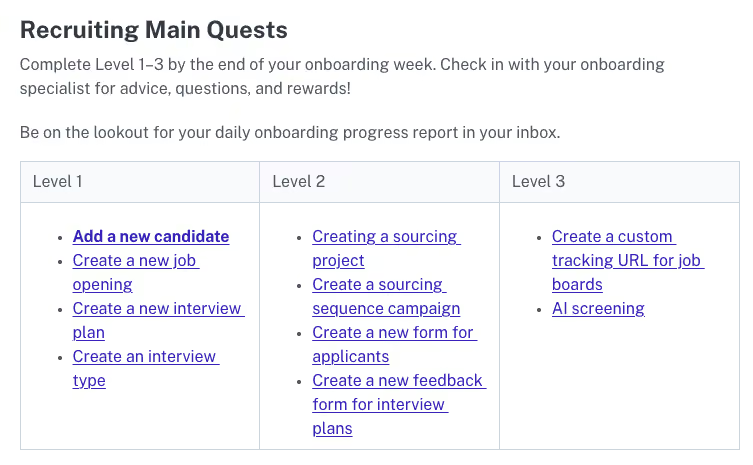
- The Quest Log: Bruce broke down specific tasks into "Level 1" through "Level 3" quests to give his audience the chance to feel like they weren’t even at work, but rather playing a game.
- Side Quests: For high-performers who want to learn more, he added optional tasks for navigation or compliance skills.
- Manufactured Fun: To keep the vibe light, Bruce embeds GIFs, movie references, and memes directly into his Scribes!
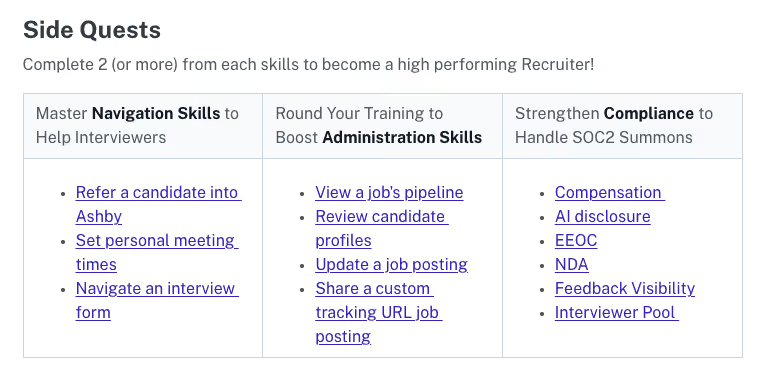
"When you're creating a Scribe, you're not just creating another SOP... you're actually curating the best practices for your users." — Bruce Lam
Meet Your Sidekick: The Power of "Guide Me"
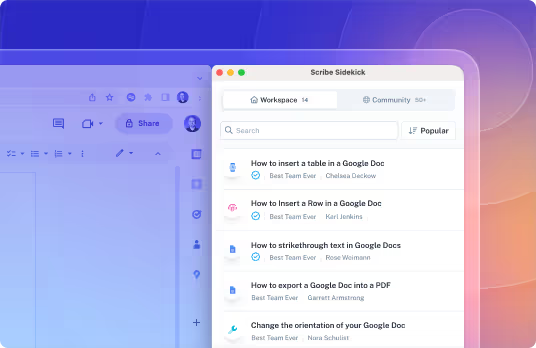
One of the most impactful tools Bruce highlighted is the Scribe Sidekick (the "Guide Me" feature).
When a user is stuck, they don't have to leave the tool to check a manual. By clicking "Guide Me," Scribe provides Click Targets to the user directly in their browser. These are little circles that highlight exactly where to click in real-time within the actual software.

This allows for side-by-side learning without needing your SME or product expert to physically train anyone. Instead of just reading about a task, users can actually complete real work (like filling out a timecard or opening a ticket) while they learn.
"My users now have me at their side without me being at their side, hovering over their shoulders, and pointing to their screen. They have these Click Targets from Guide Me that can allow them to see if they’re on the right track or not." — Bruce Lam
Bruce couples this with fun GIFs to break up the training content, provide a moment of reprieve, and positively reinforce the learner through a fun, relatable activation inside of the Scribe itself.
Building a Culture of Accountability
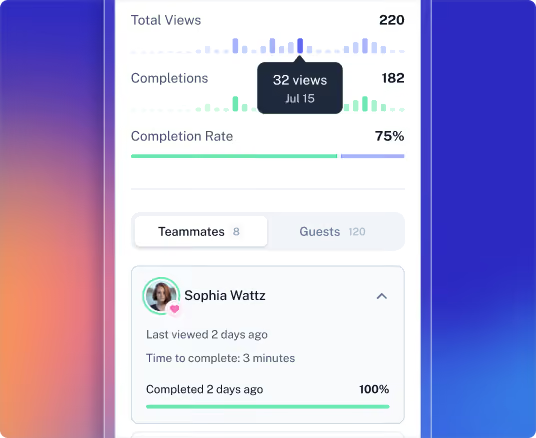
Onboarding is only successful if it's measured. Bruce uses Scribe's Insights to track who is completing tasks and how long it takes them.
The Progress Report Play
Bruce takes this data and turns it into a personalized email:
- Recap Wins: "You're kicking Ashby's butt! You finished Level 1 in 646 seconds.”
- Community Building: He invites users to a dedicated Slack or Teams channel to ask questions or request new Scribes.
- Bonus Rewards: He encourages users to "earn a bonus" by submitting a Scribe request for an outdated process, turning his users into a "team of onboarding supporters.”
Final Takeaway: Scribe Works Where You Work
Nico reminded the audience that Scribes aren't meant to live in a vacuum. You can embed them wherever your team already spends their time, and anywhere an iFrame embed is accepted:
- Intranets: SharePoint, Confluence, or internal wikis.
- Project Management: Directly into Notion pages.
- CMS: Directly into the WordPress backend for client support.
To check if you can embed a Scribe in a specific destination, check Iframely.com for all approved applications and spots around the internet.
Because Scribes use live links, any update you make to a guide is automatically pushed to every place that guide is embedded; no more worrying about "Version 2" vs. "Version 3.”
A massive thank you to Bruce Lam for showing us that tool rollouts don't have to end in a "staring contest" of blank faces. By applying game mechanics to your tech stack, you aren't just teaching a tool, you’re building an "army of Scribblers" who take pride in keeping your company’s brain up to date.
Bruce’s approach proves that when you give users the freedom to choose their own "character" and "side quests," they don't just use the tool…they master it.
Next Step: Ready to stop the manual training cycle? Connect with Bruce Lam at Boring Resume to see how he can help you gamify your next implementation.
Catch the full session below. 👇

Ready to try Scribe?


Copyright © 2026 Colony Labs, Inc. dba Scribe. All rights reserved.