



Something big
is coming!




Table of Contents


Every IT leader inherits a tech stack they didn't build. What happens when someone asks them to cut 15% of it?
Walk into a new organization, or wake up one morning after a merger, and your org’s tech stack might look like it was assembled without instructions. Two HRISs could still be live from an acquisition. Four teams are running project management on 3 different tools. The problem isn't the tools themselves. It's that people are using different tools for the same thing without realizing it.
As one IT Director at a mid-size company put it:
"We've got duplicated systems all over the place and no consistency in how people use them. I want to do a big cleanup, but I need an analyst to sit behind somebody and watch what they're doing — and that's just not feasible.”
They’re not alone. Many IT leaders find themselves in this position. The average organization wastes $21 million a year on unused SaaS licenses , and SaaS spend per employee is up nearly 22% year over year. The pressure to find savings is real. But how and where remain in the shadows. IT sees licenses. Finance sees invoices. Neither sees what people actually do with the tools.
How teams have traditionally tried to solve this
When the mandate comes down to cut costs (or defend the tools worth keeping), most teams reach for the same set of data sources:
- They check logins: SSO and authentication logs confirm someone logged in, not whether they did anything meaningful once they got there.
- They review contracts: Finance can see what was purchased, not whether it's redundant with something another team already has.
- They ask employees directly: Surveys capture what people say they need, not what they actually use day-to-day.
- Or they buy the insight: SaaS management platforms count tools and licenses, but they don't all collect the context to how the organization operates.
Every one of these gives a piece of the picture. But none gives IT leaders the piece that actually matters: what work is happening inside each tool, and where that work overlaps.
What do leaders want to do with this information?
We've talked to enterprises who are looking for visibility into how teams use tools, and they all need the same thing: data. Here are the 3 most common use cases:
- Rationalizing licenses: proving which tool costs are justified and which ones aren't delivering value.
- Legacy system consolidation: getting everyone working in the same places after a merger, or just cleaning up years of sprawl.
- Detecting underutilized tools: making sure licenses that aren't being used are not renewed.
What we found in our own tech stack
We ran this exercise internally (in minutes), and 3 categories stood out:
- AI LLMs: We have 4 different AI tools across the company, with almost total workflow overlap.
- Project management: We have 4 different tools. Marketing, Finance, Customer Success, and Sales were all doing to-do's and task tracking, just in different places.
- CRM: We surfaced 2 systems that looked redundant on paper. But each one was serving a distinct use case that justified its own budget. Not every overlap is waste.
How to find those quick win opportunities
Scribe Optimize gives leaders the piece every other data collection method is missing: real-time visibility into what work is actually happening inside each tool and across teams. It surfaces real workflows and the tools they require, so decisions to slim the tech stack are based on what people actually use, not what's on an invoice. Here are 3 ways enterprises find redundant tooling using Optimize:
1. Use agents to find waste
Scribe Optimize gives you a personal AI agent that already knows how work happens across your organization, including which tools are being used by which teams.
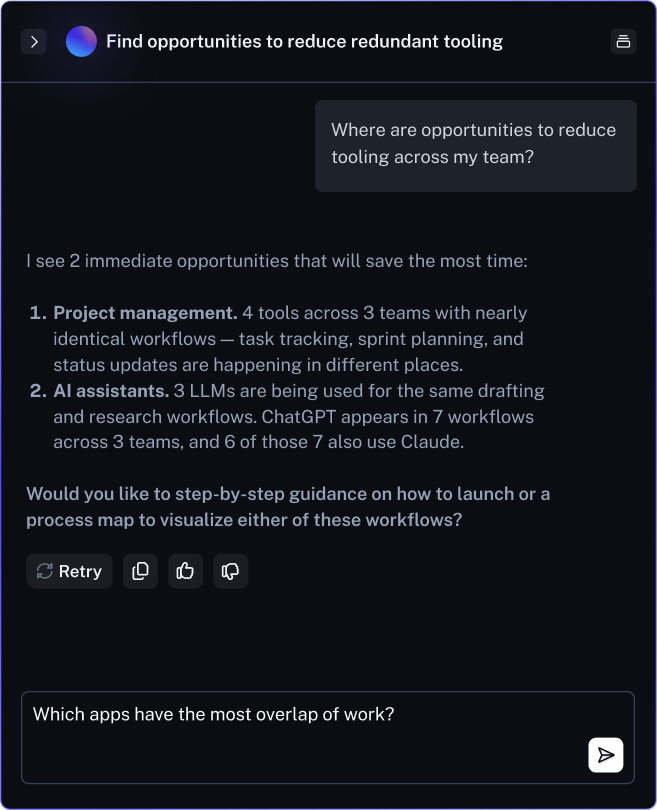
- Determine which tools are used to accomplish the same tasks. Ask your agent, "Where are opportunities to consolidate tech across my team?" It will lay out which tools are being used for similar work using workflows it surfaces.
- Dig deeper for more context or a detailed action plan. Drill into which apps have the most overlap, what people are actually accomplishing in each one, and get clear recommendations on which tool to keep.
- Cross-reference with your finance team. Knowing the overall contract costs and license count are the final pieces you need to make an informed decision on consolidation.
2. Spot redundant tools
Scribe Optimize shows which tools your org spends the most time in and what work happens using them. This instantly gives you a full picture that would otherwise take months of surveying to build manually.
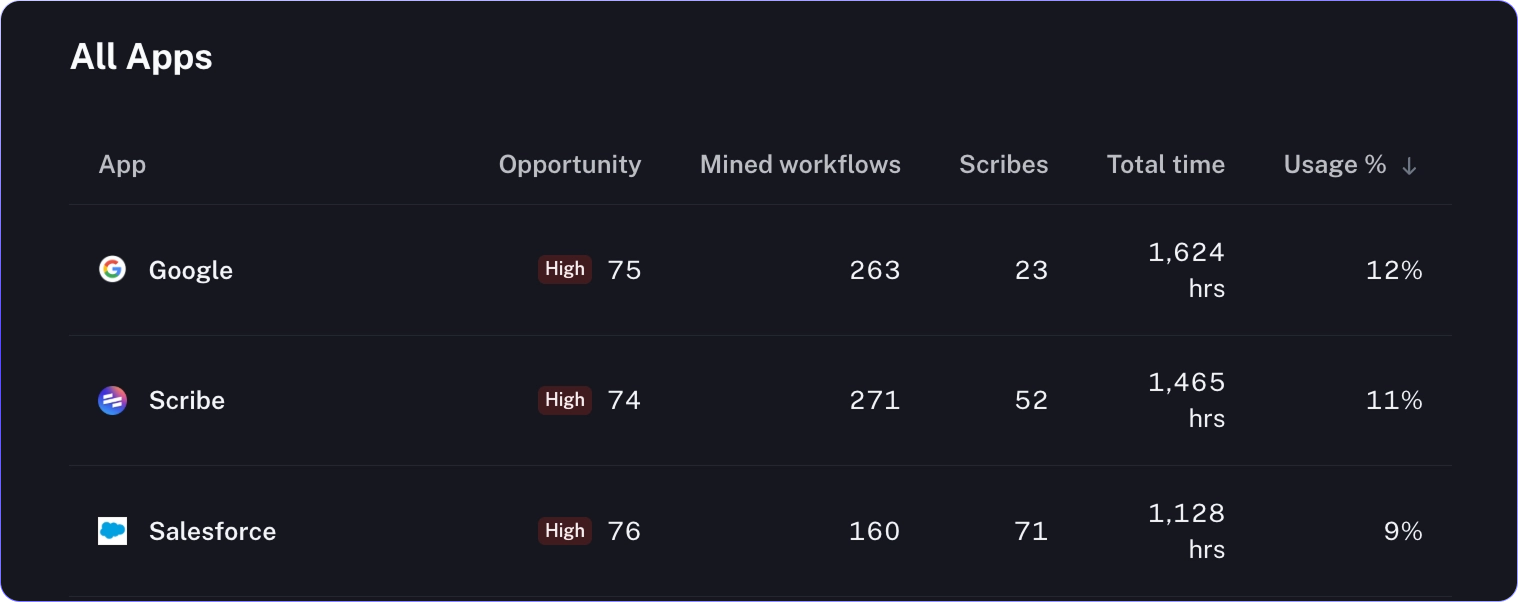
- Explore usage across apps to find similar tools immediately. See which tools your org spends the most time in and does the most work in. Get a full list of all applications used frequently across teams to spot similar ones immediately.
- Explore workflows within each app. Drill into any individual app to see the actual workflows people use it for and what they’re trying to accomplish. Get a complete audit, without a single survey or workshop.
- Build your proposal. With the data in Optimize, build a proposal on which tools have the most overlap, alongside the proof of how many people are using them.
3. Rank projects for specific types of tools
Scribe Optimize builds recommendations from the workflows it’s already surfaced — not generic recommendations from an LLM that’s never seen your operations. It knows the variances, exceptions, and use case of every tool your team uses.
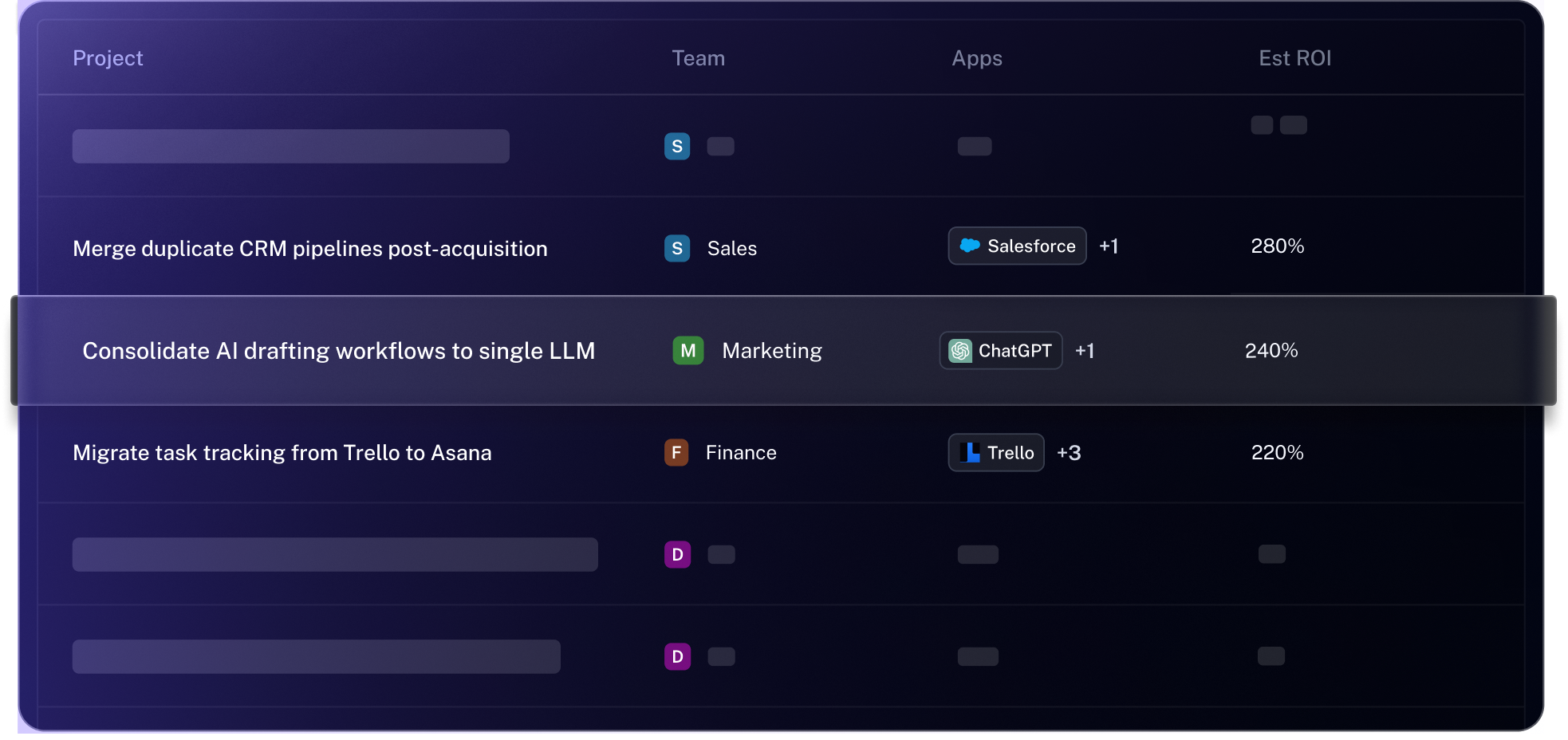
- Create projects around any workflow. Target specific apps, teams, or even shadow tools, without cutting something a team still relies on. Build a project specifically aimed at reducing costs for shadow tools.
- Rank projects based on their projected ROI. Compare consolidation candidates using ROI and time savings from real workflow data. Recommendations include guidance on verifying the consolidated tool covers each workflow.
- Modify projects to add any missing context not available in your workflows. Maybe two tools need to stay for different reasons. Just provide context on what needs to change and why, and Optimize instantly gives you a modified set of recommendations.
Cutting costs for the sake of it isn't the end goal, it's the starting point. Every dollar freed from unused licenses is a dollar that can go toward modernizing systems, strengthening security, and investing in AI that actually moves the company forward. The opportunity isn't just finding which tools people don't need. It's making sure every dollar in the tech stack is working as hard as the people who use it.



