



Meet
Autocapture




September 28, 2026
The 6 AI use cases enterprises are pursuing right now
In this article

Transformation you can finally see
Your CEO wants an AI strategy by next quarter. Your board thinks your company is behind the AI adoption curve. Nobody's told you what problem they want AI to solve.
AI rollouts typically stall, underdeliver, or solve a problem nobody actually had. Why? Typically because someone picks a use case based on what a vendor demoed, what an executive read about on a flight, or what sounded impressive in a board update. Teams copy what other companies are doing instead of figuring out what fits their own operations.
"The board keeps saying we're not doing enough with AI, but they can't give me a specific target. They just think there's some magical ROI out there."
— Chief Information Officer of a large enterprise company
There's no shortage of AI solutions. The hard part is making sure those solutions understand how your business actually works. Here's where teams are most commonly finding their first AI wins.
Most common enterprise rollouts of AI
These are the 6 use cases we see teams actively pursuing right now. Across all of these rollouts, AI won’t work if it’s starved for context.
- Powering copilots for internal knowledge — Teams are feeding docs into copilots or custom LLMs so employees can ask process questions in natural language. This gives every employee access to the same knowledge — but only if your documentation is accurate and structured enough for an AI agent to act on it.
- Self-documenting workflows — Enterprises use AI to generate documentation from the work itself, instead of asking people to write it manually. This saves a huge amount of time for teams, and is a prerequisite for #1. You can't build a useful copilot on an empty, outdated, fractured foundation of institutional knowledge.
- Process discovery and efficiency recommendations — Many companies are using AI to surface undocumented processes, identify workflow variants, and recommend improvements without anyone having to ask. This shows you exactly where AI can help first — and what needs to be in place before it will.
- Building custom AI agents for specific workflows — Teams build bots around specific domains (think: SAP support, back-office operations, internal IT) that answer questions using only approved company materials. These can help reduce time spent on repeatable tasks, but can also slow people down if they're not trained on reliable knowledge or are missing context.
- Summarization in business applications — Salesforce, ServiceNow, RingCentral, and dozens of other platforms are embedding AI to summarize context, surface next steps, and pre-populate fields. These provide small gains within individual tools, but the impact is typically limited to teams and not orgs.
- Building their own agents — Some teams launched environments where non-technical employees can build AI agents within controlled boundaries. This lets employees add their own context, but only at an individual level — not org-wide. Work becomes inconsistent and hard to scale.
Choosing your starting point
- Start with workflows you know well. If your documentation is current and reflects how people actually work, AI can interpret the rules, exceptions, and context correctly. If it doesn't, start here (or take our assessment to see where you stand).
- Start where you have the most to gain. Without insight, finding opportunities with the most potential ROI is impossible. There are AI-native tools that make insight collection quick and easy. The right ones don't just show where work can be improved — they provide AI solutions the full context on how your org operates.
- Start where you can measure. Building a business case means tracking real metrics — how much time was saved, how many processes were standardized, and whether people actually changed how they work. Don't just measure whether AI changed the process. Measure whether your team adopted it.
How Scribe helps you roll out AI
No matter what you're using AI to do, its success depends on knowing how work actually gets done. Every day, thousands of tasks, decisions, handoffs, and exceptions play out across your organization. Without context about the workflows, decision logic, constraints, and dependencies behind them, AI can only guess what to do versus know. That's why AI gets stuck and ROI stays theoretical. Scribe Optimize gives you 3 ways to find the AI rollouts your org actually needs, built on context you're already collecting.
1. Ask Optimize any question in any way
Scribe Optimize gives you an AI agent that already knows how work gets done across your organization.
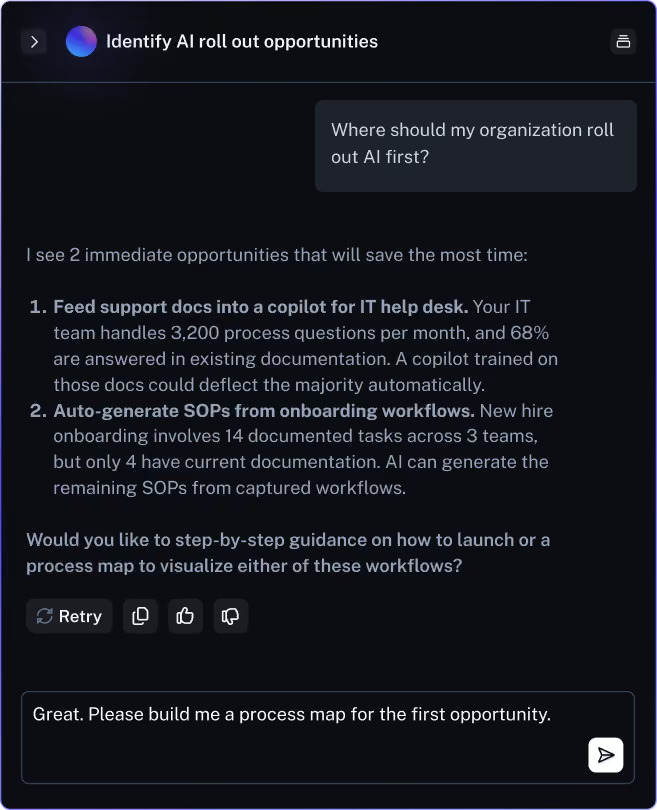
- Find your org’s biggest AI opportunities. Ask 'where should we roll out AI first?' and get ranked recommendations based on your actual workflows.
- See the context behind any recommendation. Optimize shows you process maps and the data you need so you understand where AI could make the most impact.
- Get a tailored action plan. Go deeper on any recommendation to get a specific execution plan based on the tools your teams are already using.
2. Build the context needed for AI and your teams
Scribe captures and documents the work your teams do, giving AI the context it needs to make recommendations or take actions based on how your team actually operates.
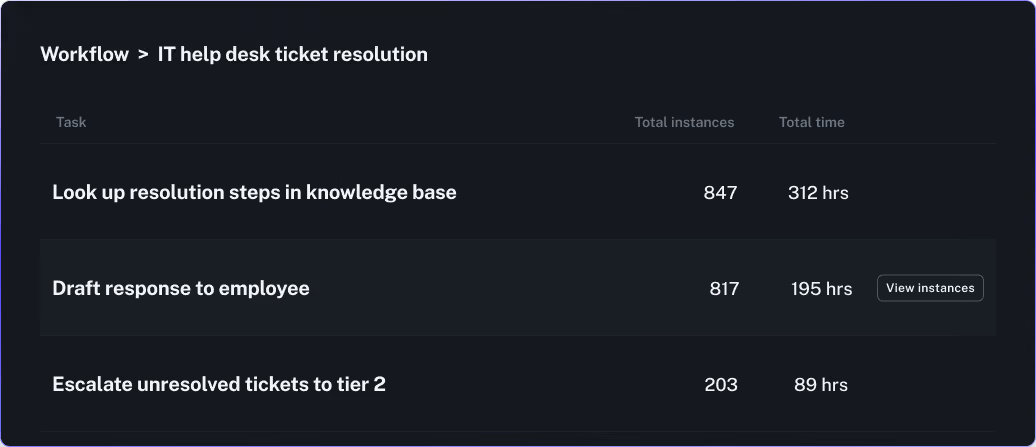
- See your most common workflows. Optimize ranks workflows by time spent and frequency, so you can see where your teams' effort is concentrated.
- Find the tasks that matter most. Break any workflow into individual tasks to find which ones happen most often or take the longest. Double click to see exactly how that task actually gets done.
- Select the best path for agents and teams to use. Each task shows variations in how it gets done. From here, you can standardize the best path into a step-by-step guide that both agents and your team follow.
3. Create a Project where AI is part of the solution
Scribe Optimize lets you build and customize improvement projects to fit your needs. Choose any workflow you want to improve and Optimize will build a project around it with AI as part of the solution.

- Choose any workflow that needs improvement. Optimize lays out what’s happening today, why it matters, and the most effective ways to improve that workflow. Edit anything that needs adjusting before you commit.
- Find solutions that use AI to improve your org’s workflows. Tell Optimize to include AI in the solution, along with any relevant tools (like LLMs or copilots) that you want involved.
- Get step-by-step detail for any solution. Each solution comes with a specific checklist — what to build, in what order, and with which tools.
AI mandates don’t fail because the technology isn’t ready. They fail because the organization didn’t give AI enough to work with. Give AI the context it needs to be a real member of your team — and give your CEO the proof that the mandate was met.

Ready to try Scribe?


Copyright © 2026 Colony Labs, Inc. dba Scribe. All rights reserved.