



Meet
Autocapture



September 23, 2026
How Scribe uses Scribe: Turning RevOps into a science with Optimize
See how Scribe’s RevOps team uses Scribe Optimize to uncover inefficiencies, validate pain points, and save 600+ hours with data-backed process improvements.
In this article

Transformation you can finally see
What if you could find an extra 600 hours of productivity hidden inside a single team's workflow? For Ryan Hinkley, finding these pockets of waste isn't a nice-to-have, it's the core of his roadmap.
When a new leader joins an organization, the traditional playbook is simple: shadow everyone. You sit with BDRs, AEs, and CS managers, asking them to "show me your day" and "tell me what’s painful." But as Ryan Hinkley, Scribe’s Director of Revenue Operations, quickly discovered, that manual process is fundamentally flawed.
"It’s always going to be biased," Ryan explains. "People don’t always know what they should be sharing, or they might not share everything you need to hear. It’s the 'blank slate' problem."
Using Scribe Optimize, Ryan’s team can avoid this entirely. Ryan can see exactly where sellers are bogged down by manual deal desk tasks or redundant Salesforce entries. Optimize provides a specific, objective third-party recommendation that validates exactly what the team is feeling on the ground.
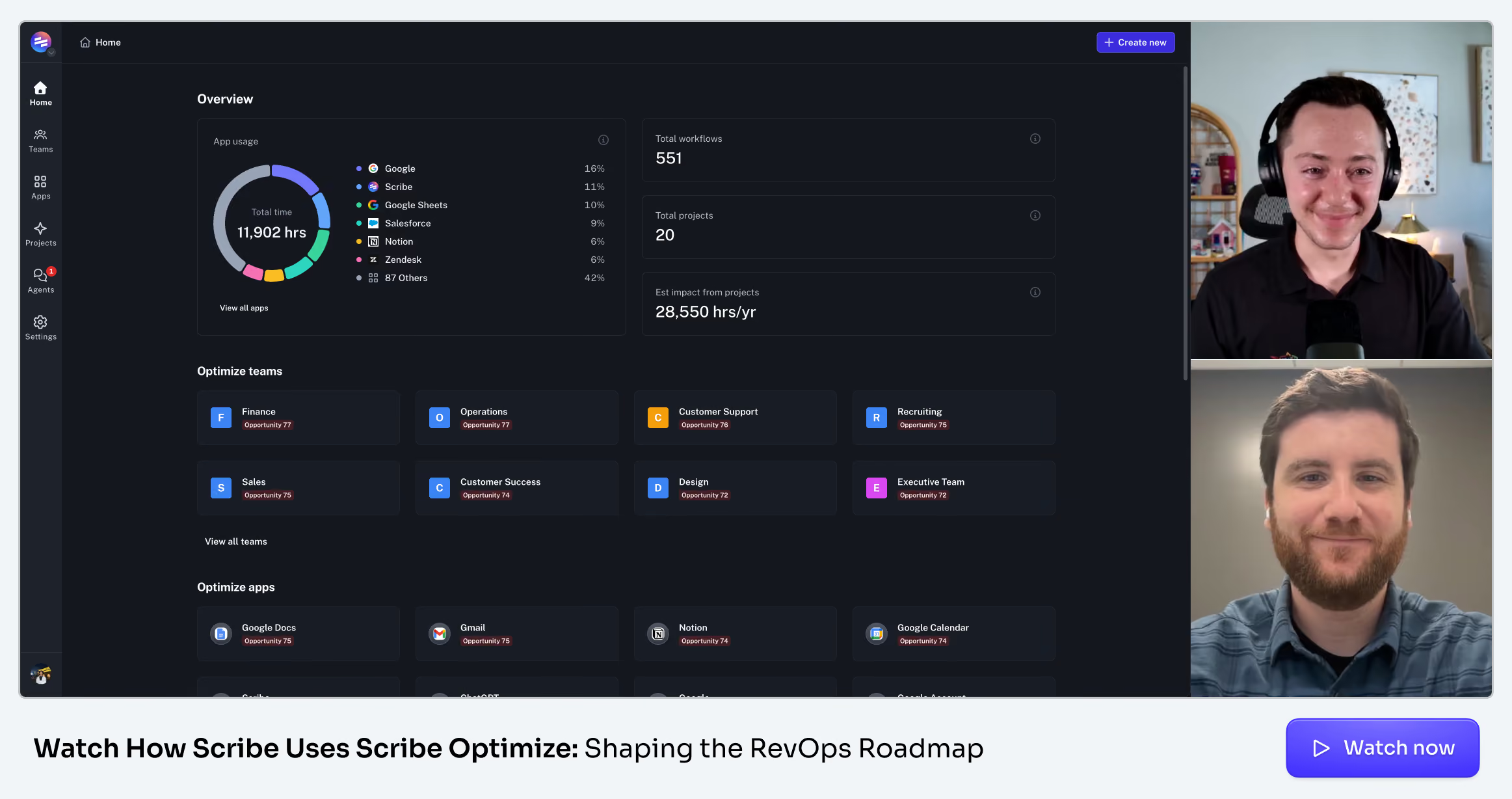
The bridge between Capture and Optimize
Most of our community knows Scribe Capture as the tool that helps you document the workflows you want the team to follow. It’s the intentional act of recording a process.
Optimize takes that concept to the next level.
"Optimize says, 'Here are the workflows we’ve captured that are inefficient or have an opportunity for automation.' It then makes a specific recommendation for the solution."
Instead of just documenting what is, Optimize builds smarter systems by identifying where manual processes can be replaced with automated ones, or even just sub-optimal workflows that are slowing your team down. By surfacing these insights objectively, you can get a clear picture of where your team’s at.
The "Optimized" onboarding
When Ryan Hinkley joined Scribe as a Revenue Operations hire, he was doing something unique: rolling out Optimize while still onboarding himself.
As someone who had spent years in operations roles, Ryan knew the traditional onboarding playbook well. "In my past roles, I spent a lot of time shadowing stakeholders: sitting down with BDRs or AEs, asking them to show me the most painful thing they do, where there's opportunity for optimization or automation," he explains.
But he also knew its limits. That kind of qualitative discovery is valuable, yet inherently flawed: it can be biased, stakeholders may not even know which problems to surface, and the process demands significant time from people who are already stretched thin. "I want to make sure I'm not in the way," Ryan noted.
Optimize changed the game. Rather than replacing the shadowing process, it supplemented it, acting as an objective third party that could surface insights grounded in real behavioral data. And the results came faster than expected: almost immediately, Optimize began generating the kinds of insights that would typically take months of one-on-one shadowing to uncover.
💡 Scribe tip: Objective insights
Avoid the "Observer Bias." Use Optimize to see how work actually happens when you aren't in the room, ensuring your process improvements are based on reality, not just feedback.
Moving the needle: Data-backed roadmaps
For Ryan, Optimize acts as a roadmap builder. During Scribe’s annual planning and Customer Org Kickoff (COKO), Ryan used Optimize's recommendations to build out the team's OKRs and strategy for the year.
What the Optimize dashboard reveals:
- Holistic App Usage: A bird’s-eye view of how different teams (Sales, Marketing, CS, Finance) are interacting with tools like Salesforce and HubSpot.
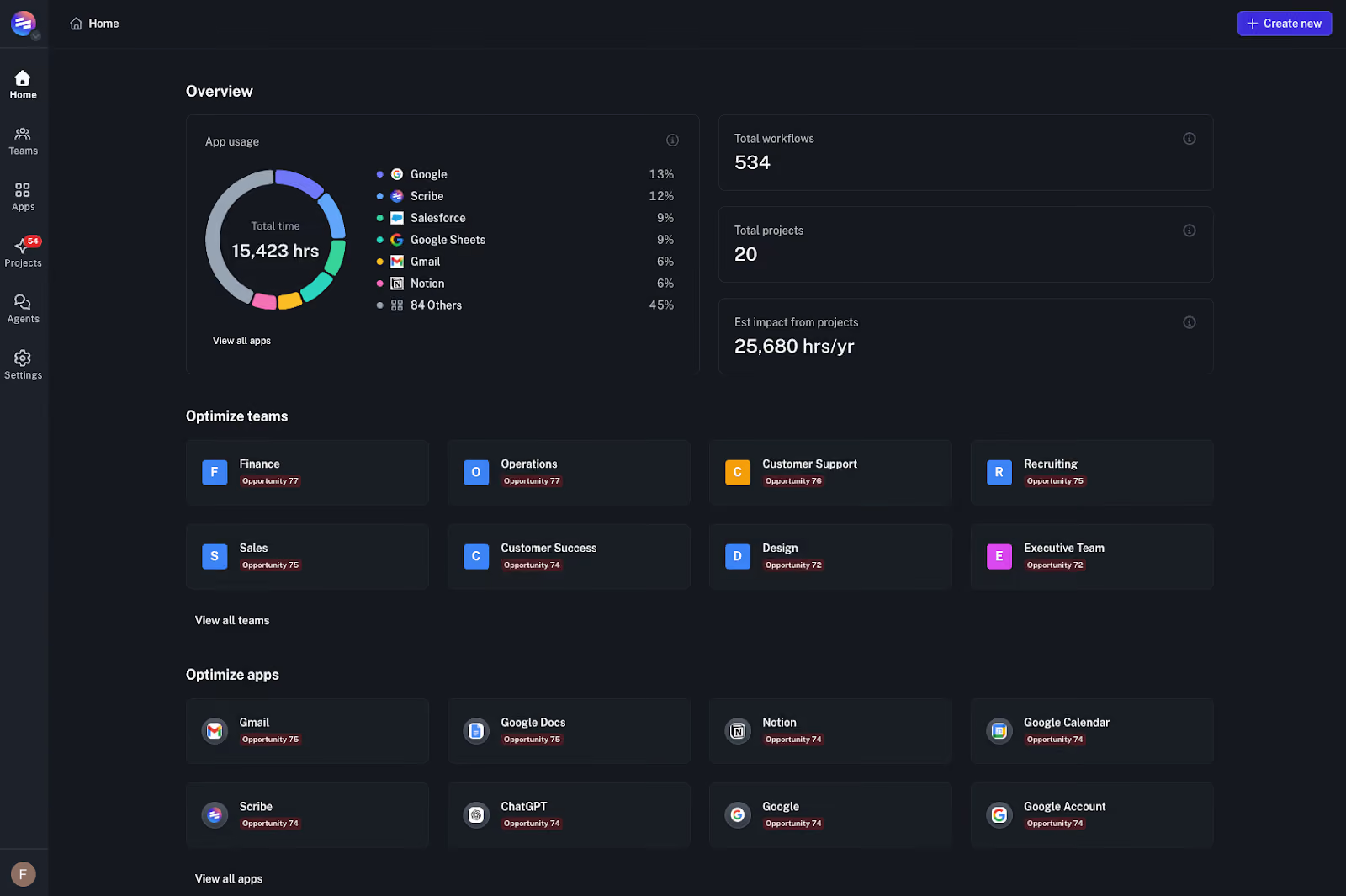
- Top Issues: Discrete moments for improvement based on actual work being done.
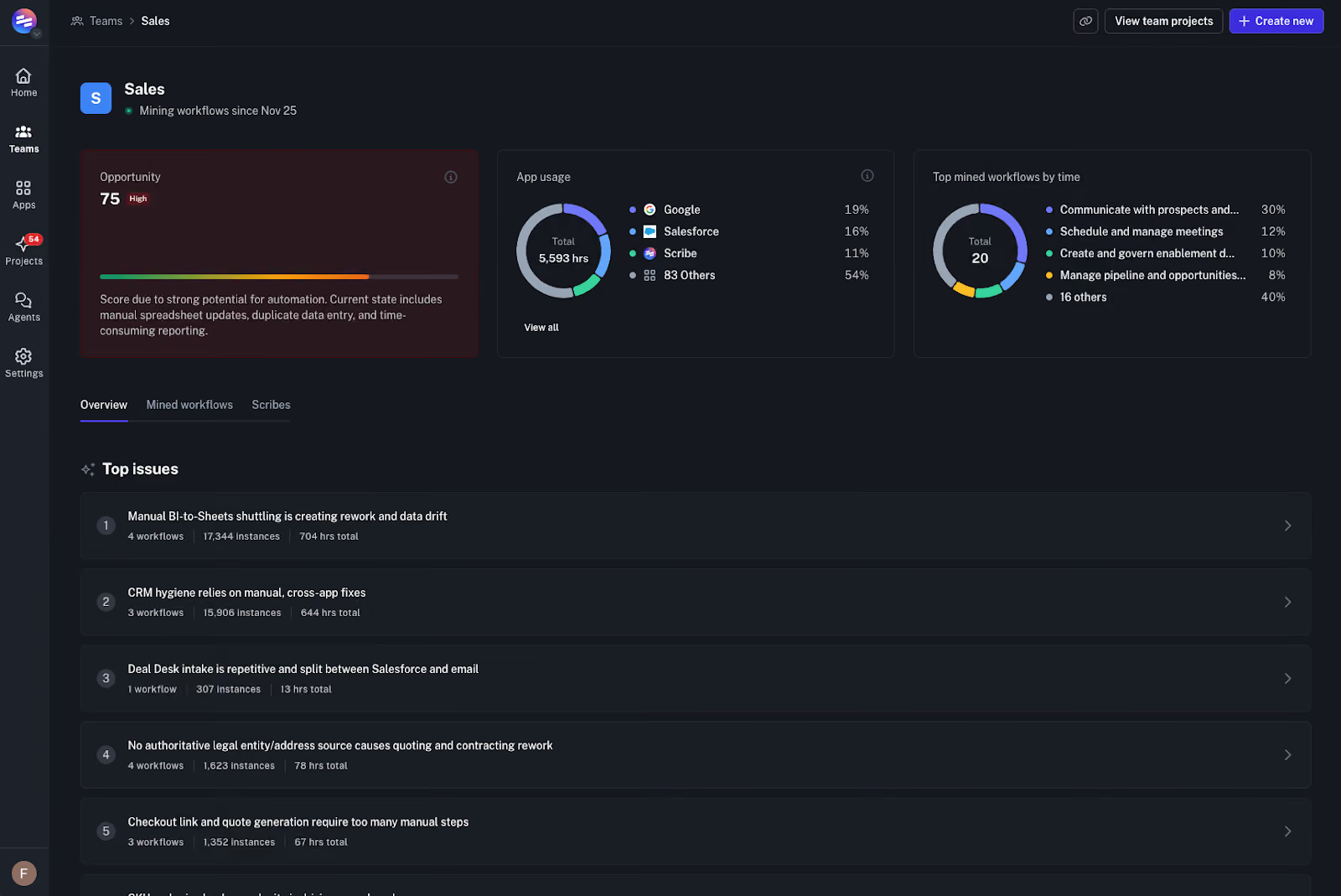
- Actionable Solutions: Specific recommendations, such as implementing Salesforce Quick Actions or template libraries.
- Quantified Impact: The ability to see exactly how many hours (often 600–700+) a project will save.
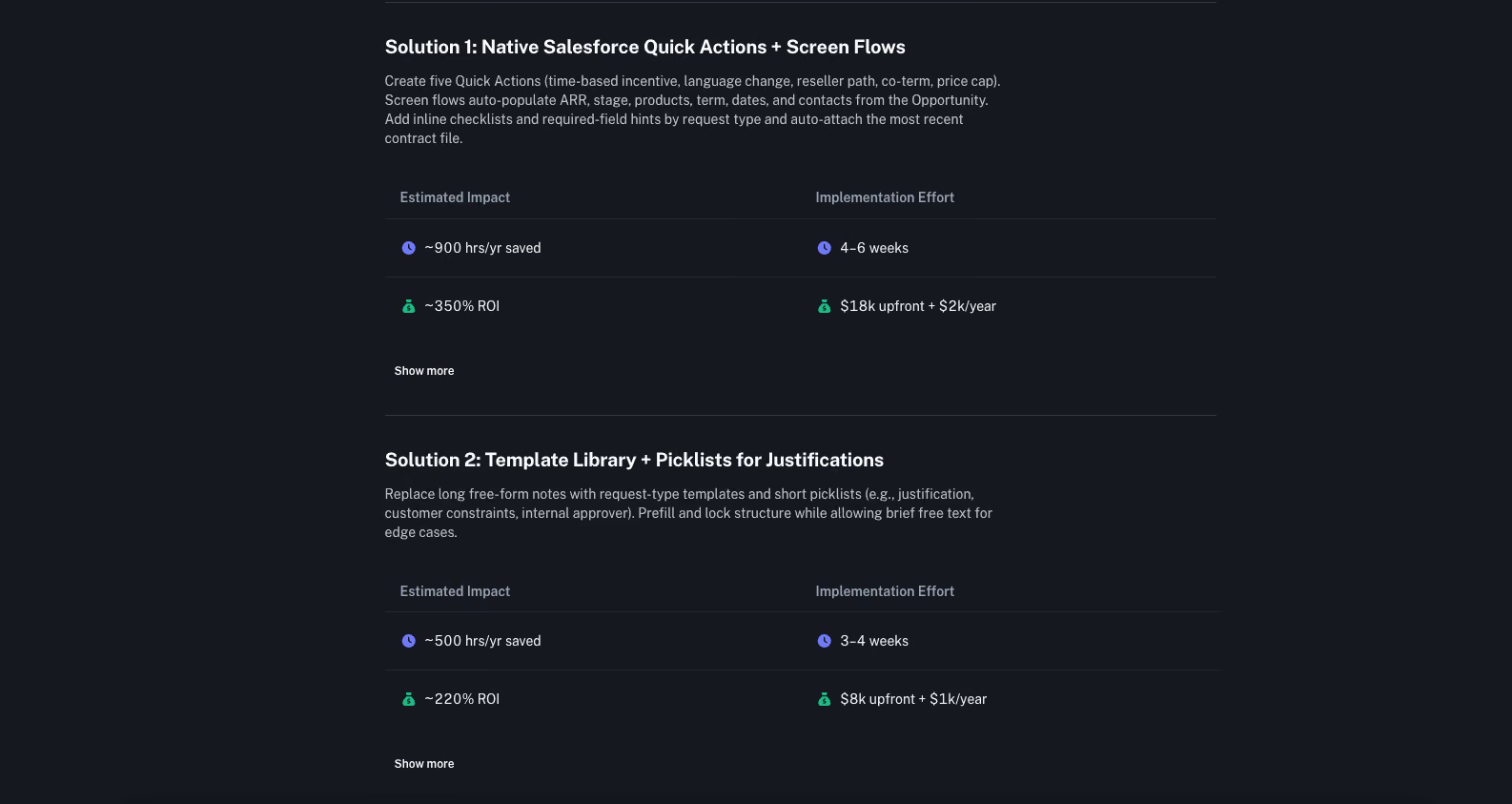
"We have around three to four pretty meaty roadmap projects right now that are almost directly tied to recommendations from Optimize," Ryan notes.
Quick wins vs. Big rocks
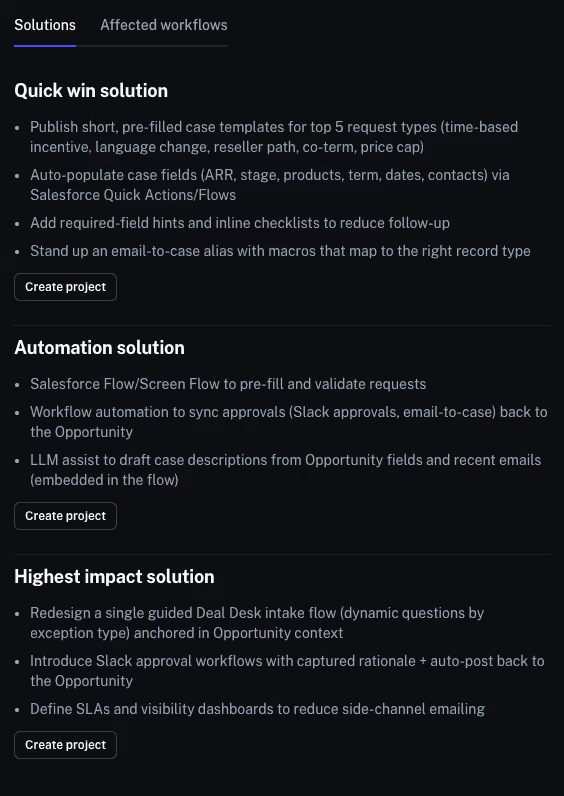
One of the most valuable aspects of the tool is how it categorizes work. Optimize identifies:
- Quick Wins: Improvements that can be implemented early and easily.
- Big Rocks: Complex problems that require more time to plan and build.
This allows the RevOps team to act as a consultant, using Optimize as a springboard for ideation to find the most "optimal" solution.
The "aha!" moment
Perhaps the most surprising part of the process for Ryan was how resonant the data was with the Scribe employees on the ground.
"I was surprised by how much it hit the nail on the head in terms of the pain our stakeholders feel," Ryan shares. "When I showed the recommendations to the sales team, it was validating for them. It said, 'This is a pain point we need to address,' and they said, 'Yes, this is exactly what I’m struggling with.'"
What’s next for Scribe RevOps?
The goal for the next six months is simple: Action.
Ryan’s team is moving from observation to implementation, continuing to use Optimize as an automated consultant. By working closely with the product team, they are ensuring that the feedback loop between how we work and how we build our product remains tighter than ever.
Ready to see what’s actually happening in your tech stack? Book a demo of Scribe Optimize today and start building your own living map of work!

.avif)
.avif)

Ready to try Scribe?


Copyright © 2026 Colony Labs, Inc. dba Scribe. All rights reserved.