



Meet
Autocapture



August 4, 2022
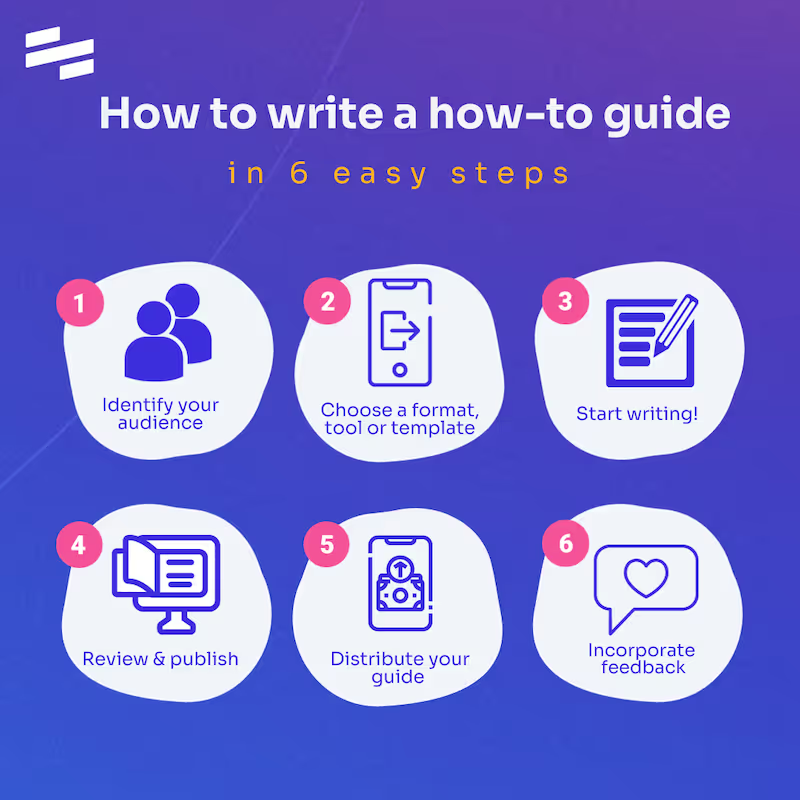
How to write a how-to guide in 6 steps
Wondering what a how-to guide is and how to write one? Follow six clear steps to create guides that help users complete tasks. Free template included.
In this article

Instantly capture and optimize workflows so your team works smarter and faster.
A good how-to guide doesn't just explain a process; it makes sure someone can actually complete it. There's a difference, and it matters more than most people think.
At Scribe, we've spent a lot of time studying what separates documentation that gets used from documentation that gets ignored. The short answer: structure, clarity, and knowing your target audience.
Here, we'll walk you through exactly how to write a how-to guide—from choosing the right format and writing clear step-by-step instructions, to using examples and templates that make the whole process faster. Whether you're documenting a workflow for your team or creating content for your customers, you'll leave with everything you need to do it well.
What is a how-to guide?
A how-to guide—sometimes called a step-by-step guide or simply a "how-to"—walks a reader through a process from start to finish. Each step typically includes an image or annotated screenshot to add context and remove any ambiguity about what the reader should be seeing or doing.
What makes how-to guides so versatile is their range. They can cover anything from informal everyday tasks to complex, multi-stage business procedures. The format stays the same; the subject matter is limitless.
The type of guide you create will usually depend on the goal behind it. Most businesses use them for one of four reasons:
- Building internal work instructions for team members who need a reliable reference for recurring tasks.
- Explaining a product or service to new users who need a clear, structured introduction.
- Capturing search engine visibility through inbound content that answers the questions people are already searching for.
- Improving the customer experience with accessible user manuals that reduce friction and support tickets.
How to create a how-to guide
Writing a great how-to guide isn't just about putting steps on a page. It's about anticipating what your reader needs, structuring information in a way that's easy to follow, and presenting it clearly enough that they can complete the task without getting stuck. Here's how to do it.
1. Define your target audience
Who will be reading this guide? A new employee, an existing customer, or a complete beginner? What do they already know, and what can't you assume? What device or platform will they be using when they follow along? The clearer your picture of the reader, the easier every subsequent decision becomes.
You can learn more about your target audience by:
- Looking into user data and support tickets
- Checking out online forums
- Researching
- Surveying your current users or new readers
- Reading the "People Also Ask" sections on Google.
2. Choose a single, specific topic
A good how-to guide covers one task completely, not several tasks partially. If your guide starts to sprawl, split it into separate guides and link them together. Scribe makes this easy: you can create individual step-by-step guides and combine them into a single, cohesive manual.
3. Map out the steps before you start writing
Walk through the process yourself and note every action, click, and decision point. Don't skip steps that feel obvious to you, as they may not be obvious to your reader. The following tips can help ensure you include all of the right information:
- Create an outline: Create a template to give your guide book a clear structure with a title, summary, tertiary hearing and process steps.
- Add a summary: Add a quick summary of the topic and expected result before you write the how-to text.
- Leave space for images: Any image or video can provide visual clarity. We recommend annotated screenshots. For example, if your reader wants to take screenshots on a MacBook, they need to be able to visualize the desktop. Scribe can do this automatically: just perform the task, and Scribe will capture each step, complete with annotated screenshots, in real time.
4. Write in plain, direct language
Use short sentences and active verbs. "Click the settings icon" is better than "The settings icon should then be clicked." Avoid jargon unless your audience will definitely know it, and keep each step to a single action. If a step requires two actions, it's probably two steps.
5. Add visuals to every step
Screenshots, annotated images, and short video clips dramatically reduce confusion and support tickets. Visuals show the reader exactly what they should be seeing at each stage, which written instructions alone can't do. Scribe automatically captures and annotates screenshots as you work, so you never have to take, crop, and upload images manually.
6. Add context where it matters
Use tips, warnings, and callouts to flag anything that could trip a reader up. If a step has a common mistake associated with it, say so. Scribe lets you insert tips and alerts directly into your guides so critical information never gets buried in the body text.
7. Review and publish your how-to guide
Once you've completed your first draft, you're ready to review the content. You or a subject matter expert should read through the guidebook to make sure you stay on topic, have visual clarity, and are providing useful information.
Proofread for potential errors. Look for spelling errors or inconsistencies, do a grammar check, and make sure your guide has a consistent tone and style.
8. Test the guide before you publish it
Ask someone unfamiliar with the process to follow your guide from start to finish. Note where they hesitate, get confused, or ask questions, as those are the gaps to fix. A guide that hasn't been tested is a guide that hasn't been finished.
9. Distribute your how-to guide
High-quality content is only effective when it reaches its audience. Here's how to distribute the final product to internal and external readers.
Share a how-to guide with employees
Make sure your teammates have access to your guides through your knowledge base or process documentation tool.
Spread the word by sending a company email or adding a note to your community workspace.
💡 How-to tip: Create categories and folders for your guidebooks. This will help teammates find more useful information on related terms.
Share a how-to guide with customers
Add your guidebook to your user help center or build a page for Frequently Asked Questions.
Share a how-to guide in content marketing
A good guide is a powerful way to raise awareness and execute an inbound marketing strategy.
Before you publish your guidebook, make sure it has:
A keyword-rich heading or title
References to your primary keyword in the main body text
Target keywords in the secondary heading and throughout the general guide to increase traffic
A consistent tone and style that avoids technical jargon and defines technical terms
💡 How-to tip: Annotated screenshots transform a good guide into a great one. They give readers an exact visual reference for what they should be seeing at each step, eliminating the guesswork that causes people to abandon a process halfway through. Scribe captures and annotates screenshots automatically as you work, so you never have to manually edit or mark up an image, but if you need to make adjustments, Scribe's built-in screenshot editor lets you highlight, redact, or annotate with just a few clicks.
10. Keep it updated
Processes change, tools get updated, and screenshots go out of date. Assign ownership of each guide so someone is responsible for keeping it accurate. With Scribe, updating a guide is as simple as re-running the process: the tool captures the new steps and refreshes the screenshots automatically.
{{banner-short-v2="/banner-ads"}}
Why is it important to create a how-to guide?
A well-written how-to guide does more than document a process. It multiplies your team's ability to execute consistently, without relying on the same people to answer the same questions over and over again.
Here are a few common case studies where a solid how-to guide can help.
1. Answering common questions fast
If you're the go-to person on your team, you probably spend a lot of time giving others the necessary information to:
- Navigate and use a tool.
- Take actionable steps to complete a process.
- Avoid confusion and costly mistakes.
When you make a how-to guide, you're able to provide an informative, relevant answer that you can easily store and share again and again.
💡 How-to tip: Ask for feedback and regularly review your guide to add new information. This will ensure your guidebook has up-to-date information.
2. Onboarding and training new employees
According to HCI, one of the biggest problems with onboarding is the lack of sufficient resources. The same study states that 20% of employees are likely to leave in the first 45 days of employment. The cost of losing new hires? Ninety to 200 percent of that employee's salary.
Hands-on training is only one piece of the puzzle. When you start building a knowledge base with how-tos, you can:
- Easily share and repurpose valuable information.
- Provide new hires with a list of steps on how to do their jobs.
- Expand their knowledge and overall productivity.
- Capture new information to avoid confusion and maintain efficiency.
💡 How-to tip: Combine several training job aids into a larger training manual, categorized by a common theme.
3. Increasing customer satisfaction
Don't underestimate the power of customer support documentation.
Sixty-nine percent of customers prefer to handle problems on their own. Build a help center or FAQ page made up of helpful guides so customers can:
- Get started with your product or service.
- Navigate your features and increase their knowledge level.
- Troubleshoot common problems.
- Answer high-demand queries.
This will help you reduce support tickets and turn your clients into expert product evangelists.
💡How-to tip: Survey your users or look at ticket data to pinpoint common issues, then write a how-to guide to answer each question.
4. Building a content marketing strategy
How many people search "How to [fill in the blank]" on Google daily?
One of the most common reasons people use search engines (and more recently, AI tools like ChatGPT extensions) is to get step-by-step instructions to help them complete a task.
Whether you're trying to capture client leads for inbound marketing, raise awareness of your product or service, or position yourself as a reputable source, a good guide is an important part of content marketing. Here's how to write one:
- Choose topics by finding high-demand user questions on an online community forum.
- Build an editorial calendar to publish blog posts for each reader's needs.
- Research the topic in a popular book or a similar guide by an expert.
- Choose a focus keyword for each article. Add internal links to related terms.
- Write instructions, giving each step an image and example.
- Optimize each blog post for search engine visibility (this will increase traffic).
- Publish your general guide.
💡How-to tip: Use search engine optimization, such as adding a keyword-rich heading, a tertiary heading, and a meta description, to perform well in search results.
Effective how-to guide examples
Different types of how-to guides serve different needs. Here are six real-life examples you can learn from today.
1. The standard how-to guide
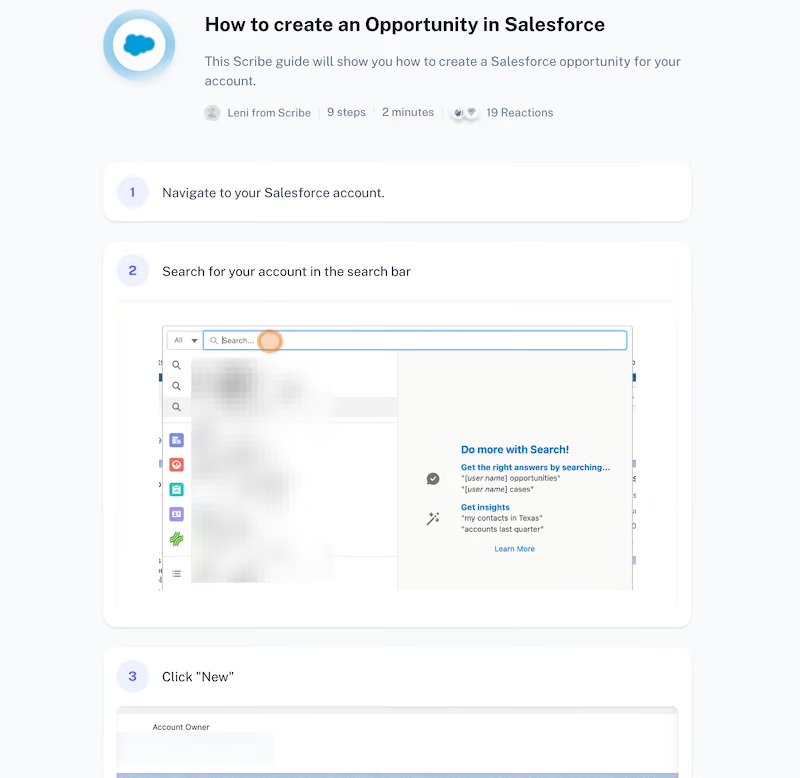
Here's a practical example of a standard guide book. This simple process document outlines:
- The purpose of the guide.
- Who created the guide (and how long it took them to make).
- The amount of process steps.
- User reactions.
- A step-by-step guide with annotated screenshots.

💡 How-to tip: Scribe is a guide generator that builds guide books and SOPs in seconds. Try it for free.
This tool is perfect for answering quick questions, building a company or client-facing knowledge base or creating standardized procedures.
Just go through your process and let Scribe do the rest. Each guide is easy to customize, share, embed or export.
2. The process how-to guide
A process guide walks readers through a repeatable task with a clear outcome. Think of an HR team's onboarding checklist: a well-structured guide tells a new hire exactly how long the process will take, what documents they'll need, what's expected of them at each stage, and what success looks like at the end. The best process guides accommodate different experience levels while keeping the language consistent throughout, so a first-day employee and a seasoned manager can both follow along without friction.
3. The B2B how-to guide
B2B guides work best when they combine practical instruction with supporting context. A finance team publishing a guide on month-end close procedures, for example, might open with a brief explanation of why the process matters, answer common questions like "what counts as a reconciling item?" or "who approves journal entries?", and attach a downloadable checklist that teams can use immediately. Identify what supporting resources (templates, spreadsheets, approval workflows) you can offer alongside the written steps, and link related topics to keep readers in your content ecosystem.
4. The B2C how-to guide
B2C guides succeed by removing barriers, not adding them. A payroll software company writing a guide for small business owners, for instance, would do well to avoid acronyms and technical language, use a conversational tone that feels approachable rather than clinical, and link out to related topics, like tax filing deadlines or contractor classification, without letting the main guide lose its focus. Keep the primary task front and center, and let supporting content live elsewhere.
5. The product how-to guide
Product documentation is where clarity matters most. A supply chain platform explaining how to set up automated purchase order approvals, for example, needs a clean structure, plain language, and zero ambiguity about what the user should be clicking, entering, or confirming at each step. The best product guides—think Stripe's developer documentation—use a logical hierarchy, remove unnecessary white space, and give users a way to signal whether the content was actually helpful. That last detail matters more than it looks: it tells you which guides need work before your support queue does.
6. The lifestyle and educational how-to guide
Not all how-to guides are procedural. Some are informational, designed to shift behavior or build understanding rather than walk someone through a specific task. A freelancer publishing a guide on managing irregular income, or an HR team sharing best practices for avoiding burnout, might use a more conversational tone, sensory detail, and a table of contents that lets readers jump to the sections most relevant to them. Numbered lists work well here because they make the content scannable without making it feel like a rigid workflow.
How-to guide template and guide creator
Here are two free solutions to help you write guide books that visually appeal to all audiences — fast.
How-to guide template
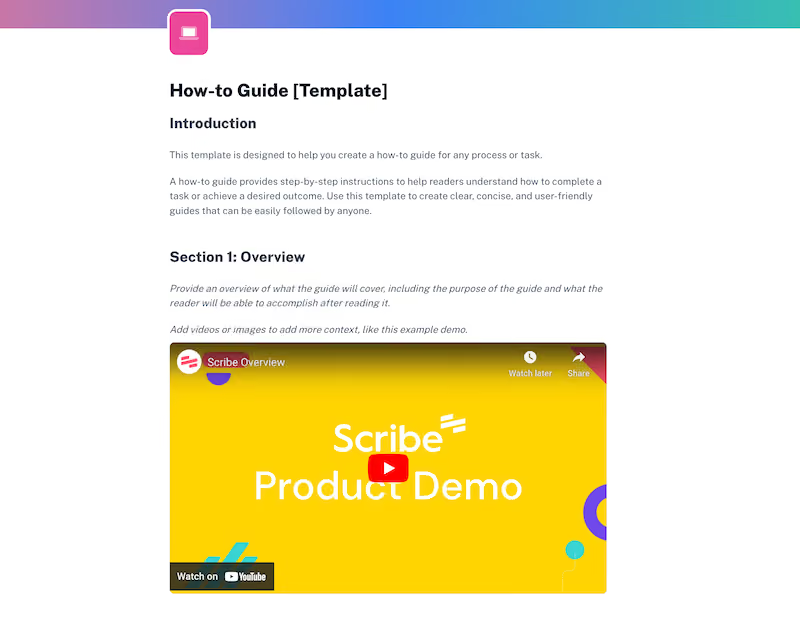
TThis free how-to guide template includes a(n):
- Introduction
- Overview
- List of needed materials
- Troubleshooting section
- Conclusion
Sign up and use this guide template for your team.
Looking for more? Check out our complete list of step-by-step guide templates.
How-to guide creator
Want something faster than a template?
Scribe is a guide generator that creates visual how-to guides in seconds.

Just download and turn on the extension and go through your process. Scribe will auto-generate a step-by-step guide, complete with text, links and annotated screenshots.
Make how-to guides for any process.
Common how-to guide challenges
Even well-intentioned documentation falls flat when it makes avoidable mistakes. Here are the most common errors and how to sidestep them.
1. Creating guides nobody can find
A guide that isn't shared is a guide that doesn't exist. Once published, make sure your content reaches the people who need it. For internal guides, that means storing them in a central knowledge base where employees can search and access them without having to ask someone. For external content, it means following a proper publishing and distribution process. Hitting "publish" is the starting line, not the finish line.
2. Writing for yourself instead of your reader
Every how-to guide exists to answer a question someone is already asking. Before you write a single word, make sure that question is real. Internally, survey employees and customers to surface the problems they're actually struggling with. Externally, use SEO tools or keyword research to validate demand before investing time in a topic. The most common documentation mistake isn't poor writing; it's writing about the wrong thing entirely.
3. Writing about something you don't fully understand
This one is simple but worth stating plainly: if you can't perform a task confidently, you shouldn't be the one documenting it. Readers, whether they're colleagues or customers, will notice the gaps, and incomplete or inaccurate guidance erodes trust quickly. Involve a subject matter expert, or better yet, have them create the guide themselves using a tool like Scribe that captures the process as they work.
4. Over-relying on paid channels to drive traffic
For teams publishing external how-to content, paid advertising is a short-term lever, not a long-term strategy. When the budget runs out, so does the visibility. Evergreen content optimized for organic search continues to drive traffic long after it's published, with minimal ongoing effort. Invest in quality content upfront and let it compound over time.
5. Underestimating the power of visuals
Dense blocks of text are one of the fastest ways to lose a reader. Break up your content with screenshots, annotated images, tables, infographics, and video where appropriate—not as decoration, but as genuine aids to understanding. Each visual should serve a purpose: showing the reader what they should see, clarifying a step that's hard to describe in words, or providing a reference they can return to. Scribe handles this automatically, capturing and annotating screenshots at every step so your guides are visual by default, not as an afterthought.
Get started making great guides with Scribe
A great how-to guide reduces questions, improves consistency, and helps people complete tasks without needing to ask for help. The hard part is finding the time to create them.
Scribe removes that barrier. Perform the task, and Scribe automatically captures every step and annotates the screenshots, producing a finished guide in seconds. Sign up for free and create your first guide today.


Ready to try Scribe?


Copyright © 2026 Colony Labs, Inc. dba Scribe. All rights reserved.